

What is MeeMoo?
MeeMoo is a chat-first personal assistant (Memo SaaS). It talks to you via MeeMoo Bot inside Telegram. With a couple of simple commands, you can:
- Save any link or text note to your private cloud space
- Search saved items with keyword, fuzzy, and semantic matching
- Collaborate in groups while keeping everyone’s data private
Core promise: Turn your daily chats into a personal, searchable library.
How MeeMoo Bot works (commands overview)
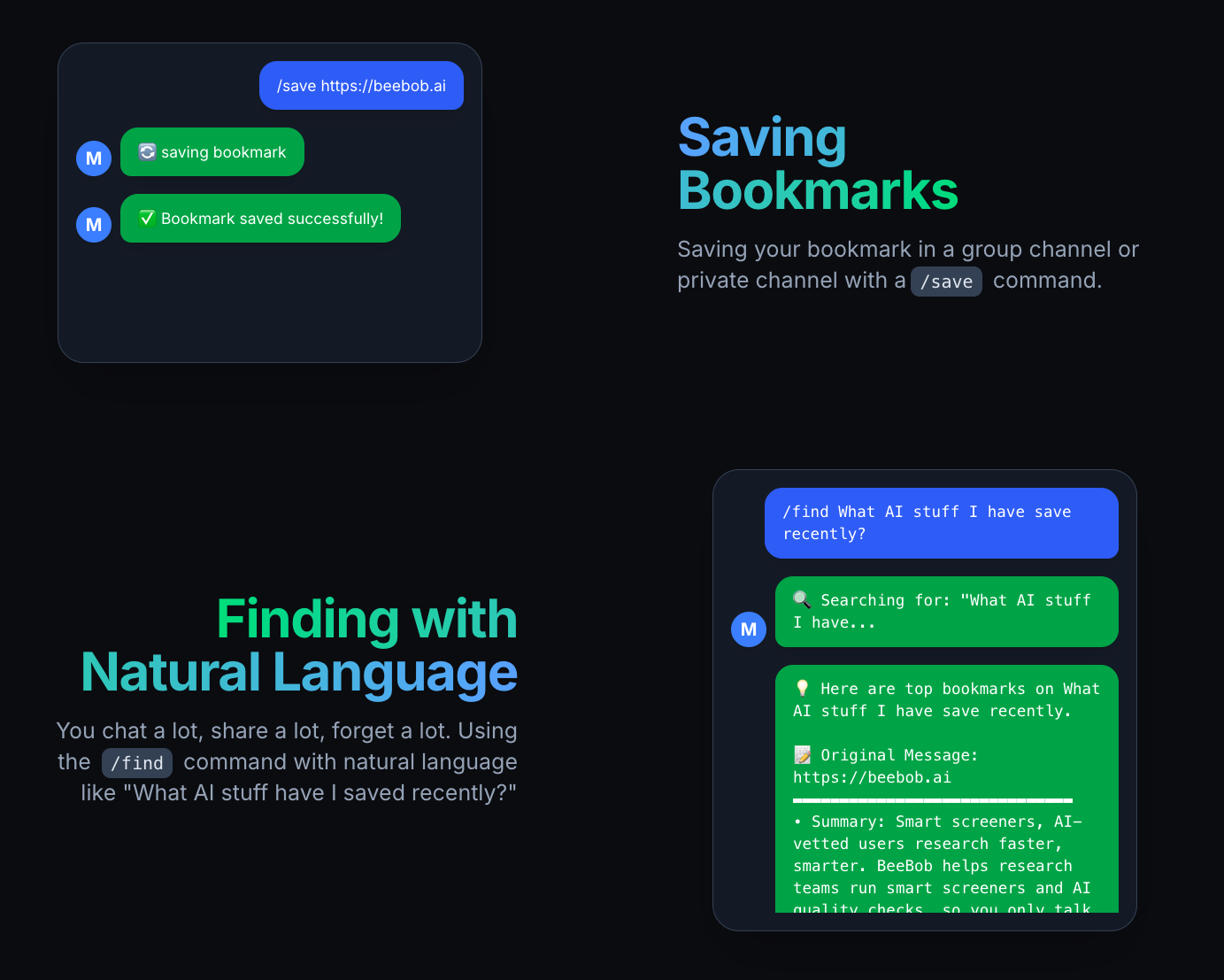
/save — Save links or text
Type in a DM or group:
/save https://example.comMeeMoo Bot will automatically fetch the page title, description, and a summary of the main content, then save it to your personal namespace.
Or save plain-text notes:
/save Meeting notes: 1) Refactor search 2) Update pricing page 3) Next week's deliverables/find — Search and get snippets
Want to retrieve something you saved? Type a keyword or concept:
/find the last tech article I saved/find AI articles/find planning meeting minutes/find browser extension tutorialHighlights:
- Supports keyword, fuzzy, and semantic matching (even with typos)
- Results come only from your personal library, ranked by relevance, with title, snippet, and original link
- Multi-language support; query and save in the language you prefer
Pro tip: Add two or three keywords to narrow results faster. For example:
/find research report summary/help — How to use
Forgot how to use it? Just type:
/helpMeeMoo Bot will reply with a quick guide: command examples, group usage, and how to save URLs and messages.
Three ways to use MeeMoo in Telegram
1) 1-on-1 with @MeeMooAiBot
Use /save or /find in a private chat with MeeMooAiBot. Everything is stored in your personal library.
2) You + another user + MeeMooAiBot
Add the bot to a 1:1 chat. Both people can use commands; each /save stores only to the initiator’s library. The chat shows the saved result; the other person does not auto-save it.
3) Group chat with MeeMooAiBot
Everyone can use /save and /find; items are still stored per person. Tip: reply to a message and then use /save to capture that message along with your save.
Privacy note: Items always belong only to the command initiator; we protect content with AES-256 encryption.
What can you save?
- Messages from others: forward or reply +
/savein groups or DMs to capture into your library. - Your own messages: memos, todos, ideas—just use
/save. - URLs: paste a link +
/save. MeeMoo Bot will crawl the title, description, and main text and produce a summary. Later, you can search by concepts—no need to remember exact keywords.
In private chat: zero-friction capture
Drop links you’re reading, ideas, todos, or meeting points straight into chat with /save. MeeMoo Bot cleans and stores them in your private library; use /find to get them back fast.
In groups: collaborate together, keep it personal
Add MeeMoo Bot to a group and everyone can use /save and /find. Each person’s /save goes only to their own library, while the chat shows the saved result and link for easy coordination.
- Co-create in groups: capture links and notes in real time
- Private by default: your saves are yours—no mixing
Search: keywords × fuzzy × semantic
MeeMoo’s search layer blends classic keyword with semantic matching, so you can find things even with partial titles or typos. Results appear right in chat—no context switching.
Why choose MeeMoo?
- Natural: operate inside the chat apps you already use daily
- Instant: no app switching—commands capture and search instantly
- Private: each user’s data is isolated by platform ID
- Smart: automatic web parsing plus semantic search
- Multi-messenger: supports Telegram and LINE; WhatsApp coming soon
Common use cases
Research / idea capture
See a paper, blog, or thread? /save it now; later /find with a few keywords to review.
Meetings & todos
Send meeting highlights or action items to MeeMoo Bot; they become searchable personal notes instantly.
Team collaboration
Use commands in groups to surface links and notes in real time—while everyone’s data remains separate.
Cross-device work
Same simple commands on phone, desktop, or tablet—wherever you chat, MeeMoo is there.
Privacy & data architecture
- Each user has a private namespace bound to their chat platform ID
- All user data is protected with AES-256 encryption in transit and at rest
- URL ingestion extracts title, description, and main text, then generates a summary
- Search supports keyword and semantic matching, returning ranked snippets
- Optional web dashboard and API to view/export your data
Get started
- Find and add MeeMoo Bot on Telegram
- Try
/save <URL or text>in a private chat - Invite MeeMoo Bot into your team group to experience personal saves in groups

FAQ
Which platforms are supported?
Available on Telegram and LINE; WhatsApp coming soon.
If I use /save in a group, does it add to others’ libraries?
No. Everyone in the group can use commands, but each item is stored only under the initiator’s account namespace. Others can see the result in chat but it won’t be added to their libraries.
Which languages are supported?
We support multi-language /save and /find. The search layer handles keyword, fuzzy, and semantic matching across languages—use the language you’re most comfortable with.
Is there a web interface?
Yes—there’s a web dashboard where you can query everything you’ve saved and manage your subscription.